Benefits of Adobe Illustrator in Graphic Design
Introduction
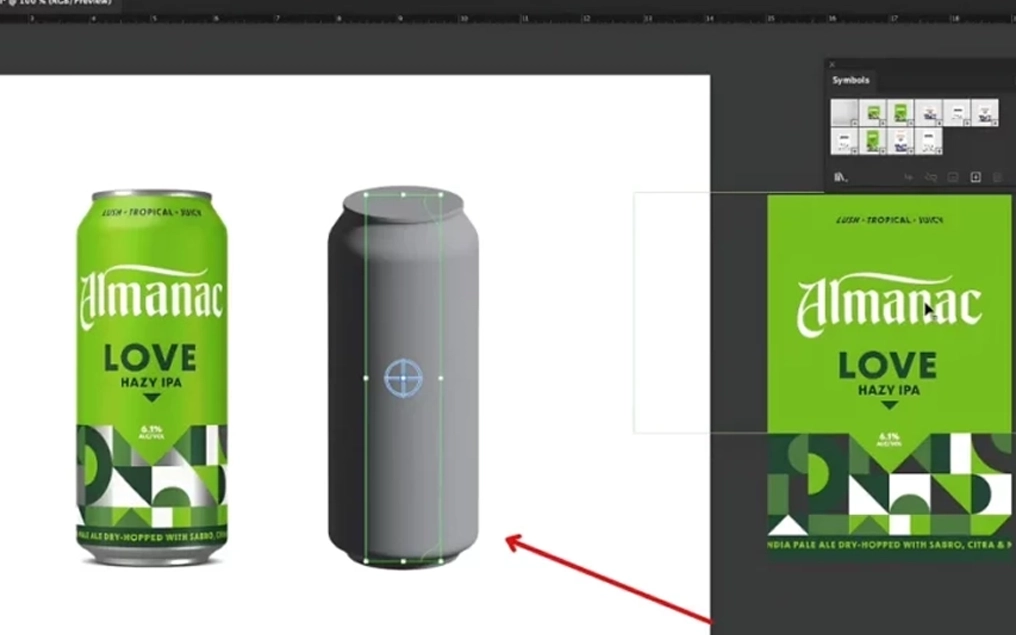
Adobe Illustrator is one of the world’s leading vector graphic design applications, widely used by professional designers, branding agencies, printing companies, and creative studios. It enables designers to create high-quality artwork that can be scaled to any size without losing clarity or quality. Illustrator has become an essential tool for designing logos, packaging, branding materials, illustrations, marketing collateral, and digital graphics.
At AinAlifArts, Adobe Illustrator is a core part of our creative workflow. It allows us to produce precise, print-ready, and professional designs that meet the highest industry standards.
What Is Adobe Illustrator?
Adobe Illustrator is a vector-based graphic design software developed by Adobe. Unlike raster-based software that uses pixels, Illustrator creates artwork using mathematical paths and shapes. This means designs remain sharp and clear whether they are printed on a business card or enlarged to a billboard.
Because of its precision and flexibility, Illustrator is widely used for:
Logo design
Brand identity
Packaging design
Product labels
Business stationery
Brochures and flyers
Infographics
Icons and illustrations
Signage
Vehicle graphics
Large-format printing
Social media graphics
Benefits of Adobe Illustrator
1. Scalable Vector Graphics
One of Illustrator’s greatest advantages is its ability to create vector graphics. Vector artwork can be resized infinitely without becoming blurry or pixelated.
This makes Illustrator ideal for:
Company logos
Packaging artwork
Billboards
Banners
Business cards
Product labels
2. Professional Logo Design
Illustrator is considered the industry standard for logo creation. Designers can create clean, precise, and editable logos that maintain quality across all applications.
Benefits include:
Perfect curves and lines
Easy color editing
Unlimited resizing
Multiple file formats
Long-term usability
3. Excellent Print Quality
Illustrator produces high-quality, print-ready files suitable for commercial printing.
Features include:
CMYK color support
Spot color compatibility
Bleed and crop mark setup
High-resolution output
PDF and EPS export
These capabilities ensure professional printing results for packaging, brochures, catalogs, and promotional materials.
4. Precision and Accuracy
Illustrator offers advanced alignment, guides, grids, and measurement tools that enable designers to create highly accurate artwork.
This precision is essential for:
Packaging dielines
Technical illustrations
Product labels
Brand guidelines
Print layouts
5. Powerful Typography Tools
Typography plays an important role in branding and communication. Illustrator provides professional text formatting tools that allow designers to create visually appealing layouts.
Designers can:
Adjust spacing and kerning
Create text on paths
Apply text effects
Outline fonts for printing
Use advanced OpenType features
6. Advanced Color Control
Illustrator offers extensive color management features that help designers maintain brand consistency.
These include:
Color libraries
Global colors
Pantone spot colors
Gradients
Swatches
Color themes
This ensures consistent colors across digital and printed materials.
7. Efficient Packaging Design
Packaging design requires precision and accuracy. Illustrator supports dielines, folding guides, cut lines, and complex layouts, making it one of the best tools for packaging production.
Designers can prepare:
Boxes
Labels
Pouches
Cartons
Stickers
Flexible packaging
8. Easy File Compatibility
Illustrator supports numerous file formats including:
AI
PDF
EPS
SVG
PNG
JPEG
TIFF
DXF
These formats allow seamless collaboration with printers, clients, and other design software.
9. Integration with Adobe Creative Cloud
Illustrator works seamlessly with other Adobe applications such as:
Adobe Photoshop
Adobe InDesign
Adobe Acrobat
Adobe After Effects
Adobe XD
This integration improves workflow and allows designers to move projects efficiently between applications.
10. Supports Creative Freedom
Illustrator offers a wide range of drawing and design tools including:
Pen Tool
Shape Builder
Pathfinder
Gradient Tool
Brushes
Symbols
Patterns
3D Effects
These features help designers transform creative ideas into professional artwork.
Benefits for Branding
Adobe Illustrator is an ideal platform for creating consistent brand identities.
It helps designers develop:
Logos
Brand guidelines
Business cards
Letterheads
Envelopes
Social media templates
Marketing materials
Product packaging
Using a single vector-based design system ensures all branding elements remain visually consistent.
Benefits for Packaging Design
Packaging demands precise measurements and flawless production files. Illustrator allows designers to:
Create accurate dielines
Align artwork perfectly
Add bleed and safety margins
Prepare printer-ready files
Maintain color consistency
This reduces printing errors and improves production efficiency.
Benefits for Large-Format Printing
Because Illustrator creates vector graphics, artwork remains sharp regardless of size.
It is ideal for:
Billboards
Exhibition displays
Store signage
Vehicle wraps
Window graphics
Posters
Trade show booths
No matter how large the artwork becomes, image quality remains excellent.
Benefits for Business
Businesses benefit from Illustrator because it enables the creation of professional marketing materials that strengthen brand identity and improve customer engagement.
Advantages include:
Professional visual communication
Consistent branding
High-quality print production
Faster design revisions
Easy file editing
Long-term usability
Adobe Illustrator at AinAlifArts
At AinAlifArts, Adobe Illustrator is one of our primary design tools for developing professional branding and packaging solutions.
We use Illustrator to create:
Logos
Packaging artwork
Product labels
Business stationery
Company profiles
Brochures
Flyers
Posters
Social media graphics
Vector illustrations
Print-ready production files
Every project is prepared according to professional printing standards, ensuring accuracy, consistency, and exceptional quality.
Conclusion
Adobe Illustrator is one of the most powerful and reliable graphic design applications available today. Its vector-based technology, precision tools, advanced typography, color management, and print-ready capabilities make it an essential resource for professional designers. Whether creating logos, packaging, branding materials, or large-format graphics, Illustrator provides the flexibility and accuracy needed to produce outstanding results.
At AinAlifArts, we leverage Adobe Illustrator to deliver creative, high-quality, and production-ready designs that help businesses build strong brands, attract customers, and succeed in competitive markets. By combining technical expertise with creative innovation, we ensure every design is visually impressive, scalable, and ready for both digital and print applications.

Benefits of Adobe Photoshop in Graphic Design
Introduction
Adobe Photoshop is one of the most powerful and widely used image editing and graphic design applications in the creative industry. It is the industry standard for photo editing, image enhancement, digital painting, advertising design, and creative artwork. Graphic designers, photographers, marketing agencies, publishers, and businesses rely on Photoshop to produce high-quality visual content for both digital and print media.
At AinAlifArts, Adobe Photoshop plays a vital role in our creative process. It enables us to enhance images, create compelling marketing materials, prepare print-ready artwork, and produce visually stunning designs that meet professional industry standards.
What Is Adobe Photoshop?
Adobe Photoshop is a raster-based image editing software developed by Adobe. Unlike vector software that uses mathematical paths, Photoshop works with pixels, allowing designers to edit photographs, create digital artwork, retouch images, and produce highly detailed visual compositions.
Photoshop is widely used for:
Photo editing
Image enhancement
Product photography
Social media graphics
Website graphics
Advertising materials
Packaging mockups
Banner design
Poster design
Digital painting
Photo manipulation
Marketing campaigns
Its advanced tools provide designers with complete creative control over every aspect of an image.
Benefits of Adobe Photoshop
1. Professional Photo Editing
Photoshop provides advanced tools for editing photographs with precision and accuracy. Designers can improve image quality while maintaining a natural appearance.
Photo editing includes:
Brightness adjustment
Contrast enhancement
Color correction
Exposure balancing
White balance correction
Cropping and straightening
Lens correction
These features help transform ordinary photographs into professional-quality visuals.
2. Image Enhancement
One of Photoshop’s greatest strengths is its ability to enhance image quality.
Image enhancement techniques include:
Sharpening
Noise reduction
Detail enhancement
Shadow recovery
Highlight correction
Color grading
Clarity improvement
Enhanced images appear cleaner, sharper, and more attractive for both digital and print applications.
3. Professional Retouching
Photoshop allows designers to remove imperfections while preserving realism.
Retouching services include:
Skin smoothing
Blemish removal
Wrinkle reduction
Dust and scratch removal
Background cleanup
Object removal
Product retouching
These capabilities are widely used in fashion, beauty, advertising, and product photography.
4. Background Removal and Replacement
Photoshop offers powerful selection tools that allow designers to remove or replace backgrounds accurately.
This is especially useful for:
Product catalogs
E-commerce stores
Marketing materials
Packaging design
Advertising campaigns
Clean backgrounds help products stand out and create a professional presentation.
5. Creative Photo Manipulation
Photoshop enables designers to combine multiple images into one seamless composition.
Applications include:
Advertising campaigns
Creative posters
Digital artwork
Movie promotions
Magazine covers
Concept illustrations
These features allow designers to create unique and visually engaging content.
6. High-Quality Print Design
Photoshop supports commercial printing by providing:
CMYK color mode
High-resolution images
Accurate color adjustments
Print-ready file preparation
Professional PDF export
These features ensure excellent printing results for brochures, posters, catalogs, packaging, and promotional materials.
7. Layer-Based Editing
One of Photoshop’s most valuable features is its layer system.
Layers allow designers to:
Edit elements independently
Make non-destructive changes
Organize complex projects
Apply effects selectively
Modify designs efficiently
This improves flexibility and reduces editing time.
8. Smart Objects and Non-Destructive Editing
Smart Objects enable designers to resize, transform, and edit images without permanently affecting the original file.
Benefits include:
Better image quality
Easy revisions
Flexible editing
Reusable design components
This workflow helps maintain professional standards throughout the design process.
9. Powerful Text and Typography Tools
Photoshop includes professional typography features that allow designers to create attractive layouts for:
Posters
Advertisements
Social media graphics
Web banners
Promotional materials
Text effects, blending options, and layer styles enhance the overall visual impact of designs.
10. Integration with Adobe Creative Cloud
Photoshop integrates seamlessly with other Adobe applications such as:
Adobe Illustrator
Adobe InDesign
Adobe Lightroom
Adobe Acrobat
Adobe After Effects
Adobe Premiere Pro
This integration enables smooth collaboration across creative projects.
Benefits for Branding
Professional branding requires consistent, high-quality visuals. Photoshop helps businesses produce polished images for:
Company profiles
Advertising campaigns
Social media content
Product catalogs
Website banners
Promotional graphics
Strong visual consistency strengthens brand identity and improves customer recognition.
Benefits for Packaging Design
Photoshop is widely used during the packaging design process to:
Enhance product photographs
Prepare packaging mockups
Create realistic textures
Apply label artwork
Produce marketing presentations
Improve product visualization
These features help clients evaluate packaging before production begins.
Benefits for Digital Marketing
Digital marketing relies heavily on eye-catching visuals. Photoshop enables designers to create engaging content for:
Facebook advertisements
Instagram posts
LinkedIn graphics
Website banners
Email campaigns
Display advertising
Promotional graphics
Professional visuals increase audience engagement and improve marketing performance.
Benefits for E-Commerce
Online shopping depends on high-quality product images. Photoshop helps businesses create professional product photography by:
Removing backgrounds
Correcting colors
Improving sharpness
Standardizing product images
Creating promotional banners
These improvements build customer trust and enhance the online shopping experience.
Time-Saving Features
Photoshop includes automation tools that improve productivity, such as:
Actions
Batch processing
Presets
Templates
Smart Filters
Layer Comps
These features help designers complete repetitive tasks more efficiently while maintaining consistency.
Adobe Photoshop at AinAlifArts
At AinAlifArts, Adobe Photoshop is an essential part of our creative workflow. We use it to deliver visually compelling, production-ready designs that meet the highest standards of quality.
Our Photoshop-based services include:
Professional image enhancement
Product photo editing
Background removal
High-end retouching
Packaging mockups
Advertising graphics
Social media creatives
Website banners
Poster and flyer design
Photo restoration
Print-ready artwork preparation
Every project undergoes careful quality control to ensure outstanding results for both digital and print applications.
Benefits to Our Clients
Clients who choose AinAlifArts benefit from:
High-quality image editing
Professional visual presentation
Improved product appeal
Stronger brand identity
Faster project completion
Print-ready artwork
Enhanced marketing materials
Better customer engagement
Reliable and consistent design quality
Conclusion
Adobe Photoshop is one of the most versatile and powerful tools available for graphic design and image editing. Its advanced capabilities in photo enhancement, retouching, digital artwork, layout design, and print preparation make it an indispensable application for creative professionals. Whether designing marketing materials, editing product photographs, creating social media content, or preparing artwork for commercial printing, Photoshop provides the flexibility and precision needed to achieve exceptional results.
At AinAlifArts, we use Adobe Photoshop to transform ideas into impactful visual experiences. By combining creativity with technical expertise, we deliver high-quality designs that enhance brand identity, improve product presentation, and support our clients’ marketing and business goals.

Benefits of Topaz Photo AI in Graphic Design
Introduction
Topaz Photo AI is an advanced artificial intelligence (AI) image enhancement software designed to improve the quality of photographs and digital images automatically. It combines powerful AI technologies to sharpen images, reduce noise, restore details, and increase image resolution while maintaining a natural appearance. It has become an essential tool for photographers, graphic designers, advertising agencies, and creative studios that require high-quality visuals for print and digital media.
At AinAlifArts, Topaz Photo AI is used alongside professional design software such as Adobe Photoshop and Adobe Illustrator to enhance image quality before the design process begins. This ensures that every project is built on clear, detailed, and professional-quality images.
What Is Topaz Photo AI?
Topaz Photo AI is an AI-powered image enhancement application that automatically analyzes photographs and applies intelligent corrections to improve their quality. Instead of relying solely on manual editing, the software uses machine learning to recognize faces, textures, edges, and fine details, producing realistic enhancements with minimal effort.
The software is commonly used for:
Image sharpening
Noise reduction
Image upscaling
Photo restoration
Portrait enhancement
Product photography improvement
Wildlife photography
Landscape photography
Commercial advertising images
Print preparation
Its intelligent automation saves time while delivering consistently high-quality results.
Benefits of Topaz Photo AI
1. AI-Powered Image Enhancement
Topaz Photo AI automatically analyzes each image and applies the most suitable improvements. It identifies areas that require sharpening, noise reduction, or resolution enhancement without affecting the natural appearance of the photograph.
This results in cleaner, sharper, and more professional images with minimal manual editing.
2. Exceptional Image Sharpening
Blurry photographs can reduce the quality of graphic designs and marketing materials. Topaz Photo AI uses advanced AI models to recover fine details and improve image sharpness without introducing unwanted artifacts.
Sharper images are especially important for:
Product photography
Packaging design
Advertising
Brochures
Company profiles
Large-format printing
3. Intelligent Noise Reduction
Images captured in low-light conditions often contain digital noise or grain. Topaz Photo AI effectively removes this noise while preserving important details and textures.
Benefits include:
Cleaner photographs
Improved clarity
Better color accuracy
Professional-looking results
Higher print quality
4. High-Quality Image Upscaling
One of the software’s most valuable features is its ability to enlarge images while maintaining detail and sharpness. Traditional resizing methods often produce blurry or pixelated results, whereas AI-powered upscaling intelligently recreates fine details.
This is especially useful for:
Posters
Billboards
Exhibition displays
Product packaging
Signage
Marketing banners
5. Improved Portrait Quality
Topaz Photo AI detects faces automatically and enhances facial details while maintaining a natural appearance.
Portrait improvements include:
Sharper eyes
Better skin texture
Natural facial detail
Reduced blur
Enhanced clarity
These features are valuable for corporate profiles, promotional campaigns, and professional photography.
6. Better Product Photography
High-quality product images are essential for successful branding and marketing. Topaz Photo AI enhances product photographs by improving sharpness, reducing noise, and increasing overall clarity.
This benefits:
E-commerce stores
Product catalogs
Packaging design
Online advertising
Print brochures
Professional product images increase customer confidence and improve brand perception.
7. Time-Saving Automation
Manual image enhancement can be time-consuming, especially when working with large numbers of photographs. Topaz Photo AI automates many repetitive editing tasks, allowing designers to process images quickly without compromising quality.
This improves productivity and shortens project timelines.
8. Better Print Quality
Commercial printing requires high-resolution images with excellent detail. Topaz Photo AI prepares images for print by enhancing sharpness, reducing noise, and improving resolution.
This helps produce superior results for:
Packaging
Brochures
Catalogs
Posters
Flyers
Product labels
9. Restoring Older Images
Topaz Photo AI can significantly improve older or lower-quality photographs by restoring lost detail, reducing blur, and enhancing overall image quality.
This makes it useful for:
Historical photographs
Family archives
Scanned documents
Vintage marketing materials
10. Seamless Workflow with Adobe Software
Topaz Photo AI integrates well with professional design applications, including:
Adobe Photoshop
Adobe Lightroom
Adobe Illustrator (through enhanced raster assets)
Designers can enhance images in Topaz Photo AI and continue editing them in Adobe software without interrupting their workflow.
Benefits for Graphic Design
Topaz Photo AI helps graphic designers create more professional and visually appealing work by improving the quality of source images before they are incorporated into layouts.
It is especially useful for:
Advertising graphics
Social media posts
Company profiles
Posters
Magazine layouts
Website banners
Marketing materials
Higher-quality images produce stronger visual communication and a more polished final design.
Benefits for Packaging and Branding
Packaging and branding often rely on detailed product photography. AI-enhanced images improve the overall appearance of labels, boxes, catalogs, and promotional materials.
Benefits include:
More attractive packaging
Consistent image quality
Enhanced brand presentation
Better product visualization
Increased customer confidence
Benefits for Large-Format Printing
Large-format prints require high-resolution images to maintain quality when viewed up close.
Topaz Photo AI helps prepare images for:
Billboards
Store signage
Trade show displays
Exhibition panels
Vehicle graphics
Window displays
AI upscaling ensures that enlarged images remain clear and detailed.
Topaz Photo AI at AinAlifArts
At AinAlifArts, Topaz Photo AI is an important part of our image enhancement workflow. Before creating packaging, branding, or marketing materials, we improve image quality using AI-powered technology to ensure every project begins with the highest-quality visuals.
Our image enhancement services include:
AI-powered image sharpening
Noise reduction
High-resolution upscaling
Product photo enhancement
Portrait enhancement
Image restoration
Print preparation
Marketing image optimization
By combining Topaz Photo AI with Adobe Photoshop and Adobe Illustrator, we deliver exceptional image quality for both digital and commercial print projects.
Benefits to Our Clients
Clients who benefit from our Topaz Photo AI workflow receive:
Sharper and clearer images
Higher-quality print results
Improved product presentation
Professional marketing visuals
Faster project completion
Better branding consistency
Enhanced customer engagement
Increased confidence in promotional materials
Conclusion
Topaz Photo AI has transformed modern image enhancement by using artificial intelligence to produce high-quality, natural-looking improvements with speed and precision. Its capabilities in sharpening, noise reduction, image upscaling, and photo restoration make it an invaluable tool for graphic designers, photographers, and creative professionals.
At AinAlifArts, we integrate Topaz Photo AI into our design process to ensure every image meets the highest standards before it is used in branding, packaging, advertising, or print production. By combining AI-powered technology with creative expertise, we deliver visually striking, professional-quality designs that help our clients build stronger brands and achieve outstanding results.
Benefits of CorelDRAW in Graphic Design
Introduction
CorelDRAW is one of the world’s leading vector graphic design applications, trusted by graphic designers, print shops, sign makers, branding agencies, and packaging companies. Known for its powerful vector illustration tools, intuitive interface, and excellent print production capabilities, CorelDRAW enables designers to create professional artwork for both digital and commercial printing.
For many years, CorelDRAW has been a preferred choice in the printing industry because of its precision, flexibility, and compatibility with various printing and cutting devices. It is widely used to design logos, brochures, packaging, banners, business cards, vehicle graphics, apparel designs, and promotional materials.
At AinAlifArts, CorelDRAW is an important part of our creative workflow. We use it to develop accurate, print-ready artwork that meets the highest standards of quality and production.
What Is CorelDRAW?
CorelDRAW is a professional vector graphic design software developed by Corel Corporation. Unlike raster-based software that uses pixels, CorelDRAW creates artwork using mathematical vectors. This allows designs to be enlarged or reduced without any loss of quality.
The software is widely used for:
Logo design
Branding materials
Product packaging
Business stationery
Brochures and flyers
Signboards
Banners
Vehicle wraps
Apparel graphics
Product labels
Laser cutting and engraving artwork
Large-format printing
Its powerful design tools make it suitable for businesses of all sizes, from small print shops to large design agencies.
Benefits of CorelDRAW
1. High-Quality Vector Graphics
CorelDRAW creates vector artwork that remains sharp and clear regardless of size. Unlike bitmap images, vector graphics can be enlarged for billboards or reduced for business cards without becoming blurry.
This makes it ideal for:
Company logos
Product packaging
Posters
Signage
Promotional banners
Marketing materials
2. Professional Print Design
CorelDRAW is widely recognized for its excellent print production capabilities. Designers can prepare accurate, print-ready files with confidence.
Its printing features include:
CMYK color support
Spot color management
Bleed setup
Crop marks
High-resolution export
PDF creation
Commercial printing compatibility
These features help produce high-quality printed materials while reducing production errors.
3. Precision Drawing Tools
CorelDRAW provides advanced drawing tools that allow designers to create highly accurate artwork.
These include:
Pen Tool
Bézier Tool
Shape Tool
Smart Drawing Tool
Curve Editing
Node Editing
These tools enable the creation of smooth curves, detailed illustrations, and precise technical designs.
4. User-Friendly Interface
One of CorelDRAW’s strengths is its intuitive and customizable workspace. Designers can organize toolbars, shortcuts, and workspaces according to their preferences, improving productivity and making the software easy to learn for beginners while remaining powerful for professionals.
5. Excellent Typography Features
Typography is an essential part of graphic design, and CorelDRAW offers a wide range of text editing capabilities.
Designers can:
Adjust character spacing
Edit paragraph formatting
Create text on curves
Apply artistic text effects
Convert text to curves
Manage OpenType fonts
These tools help create attractive layouts for marketing and branding materials.
6. Efficient Packaging Design
CorelDRAW is widely used for packaging artwork because it supports accurate dimensions and production requirements.
Designers can create:
Cartons
Product boxes
Labels
Flexible packaging
Stickers
Folding layouts
Packaging templates
Its precision ensures that packaging artwork fits correctly on production dielines.
7. Wide File Compatibility
CorelDRAW supports numerous industry-standard file formats, allowing smooth collaboration with clients, printers, and other designers.
Supported formats include:
CDR
AI
PDF
EPS
SVG
PNG
JPEG
TIFF
DXF
DWG
This flexibility makes it easy to exchange files between different software platforms.
8. Powerful Color Management
Accurate color reproduction is essential for branding and printing. CorelDRAW provides professional color management tools that ensure consistency across different devices and printing processes.
Features include:
CMYK colors
RGB colors
Pantone spot colors
Color palettes
Color harmonies
Gradient editing
This helps maintain consistent brand colors across all marketing materials.
9. Time-Saving Productivity Tools
CorelDRAW includes many features that increase efficiency, such as:
Symbols
Templates
Object Styles
Alignment tools
PowerClip
Object Manager
Find and Replace
Batch processing
These tools reduce repetitive work and improve workflow.
10. Large-Format Printing Support
CorelDRAW is one of the most popular applications for large-format printing because vector artwork retains its quality at any size.
It is commonly used for:
Billboards
Store signage
Exhibition displays
Vehicle graphics
Window decals
Trade show booths
Wall graphics
Designs remain crisp and professional even when printed at very large dimensions.
Benefits for Branding
Strong branding depends on consistent, high-quality visual communication. CorelDRAW enables designers to create a complete visual identity, including:
Logos
Business cards
Letterheads
Envelopes
Company profiles
Brochures
Brand guidelines
Promotional materials
Because these elements are vector-based, they can be adapted for both digital and print applications without compromising quality.
Benefits for Packaging Design
Packaging requires precision and technical accuracy. CorelDRAW helps designers prepare production-ready artwork with correct dimensions, alignment, and color management.
Advantages include:
Accurate dieline placement
Clean vector graphics
Professional labeling
Print-ready layouts
Consistent branding
These features improve production efficiency and reduce printing errors.
Benefits for Signage and Promotional Products
CorelDRAW is widely used in the signage industry because it creates artwork compatible with vinyl cutters, CNC machines, laser engravers, and digital printers.
Applications include:
Shop signs
Banners
Vehicle wraps
Window graphics
Promotional displays
Exhibition materials
Its precision makes it ideal for large-scale commercial projects.
Collaboration with Other Software
CorelDRAW integrates well with many design and production tools. Designers can import and export files for use in applications such as:
Adobe Photoshop
Adobe Illustrator
AutoCAD
RIP software for digital printing
Laser engraving software
This compatibility allows efficient collaboration across different production environments.
CorelDRAW at AinAlifArts
At AinAlifArts, CorelDRAW is one of our primary tools for creating professional branding, packaging, signage, and print-ready artwork. Its precision and flexibility allow us to deliver designs that meet both creative and technical requirements.
We use CorelDRAW to create:
Logos
Packaging designs
Product labels
Brochures
Flyers
Business cards
Signboards
Banners
Vehicle graphics
Marketing materials
Print-ready production files
Every project is carefully prepared to ensure outstanding quality, accurate dimensions, and smooth commercial printing.
Benefits to Our Clients
By using CorelDRAW in our design process, AinAlifArts provides clients with:
High-quality vector artwork
Print-ready files
Accurate color management
Professional branding materials
Consistent visual identity
Faster design revisions
Excellent compatibility with commercial printers
Reliable production quality
Scalable designs for any application
Conclusion
CorelDRAW is a powerful and reliable graphic design application that has earned its reputation as one of the industry’s leading vector design tools. Its advanced illustration features, professional typography, precise drawing capabilities, and exceptional print production support make it an ideal solution for branding, packaging, signage, and marketing materials.
At AinAlifArts, we use CorelDRAW to transform creative ideas into professional, production-ready designs that help businesses build strong brands and communicate effectively. By combining technical precision with creative excellence, we deliver high-quality visual solutions that meet the evolving needs of our clients across both digital and print media.

Benefits of Esko Studio in Packaging Design
Introduction
Esko Studio is one of the world’s leading 3D packaging design and visualization software solutions. It is widely used by packaging designers, brand owners, printing companies, packaging converters, and creative agencies to create realistic three-dimensional packaging prototypes before production.
Unlike traditional flat artwork, Esko Studio enables designers to view packaging exactly as it will appear after printing, folding, and assembly. This allows clients and production teams to evaluate the design from every angle, reducing errors and improving communication throughout the packaging development process.
At AinAlifArts, Esko Studio is an essential part of our packaging design workflow. We use it to create accurate 3D packaging visualizations, verify artwork placement, and present realistic product mockups that help clients make informed decisions before printing.
What Is Esko Studio?
Esko Studio is professional packaging visualization software developed specifically for the packaging and printing industry. It transforms two-dimensional packaging artwork into realistic three-dimensional models using actual packaging dielines.
The software supports a wide variety of packaging formats, including:
Folding cartons
Corrugated boxes
Labels
Flexible pouches
Shrink sleeves
Bottles
Cans
Tubes
Cosmetic packaging
Pharmaceutical packaging
Food packaging
Beverage packaging
Designers can instantly see how artwork wraps around the package and identify any issues before production begins.
Benefits of Esko Studio
1. Realistic 3D Packaging Visualization
Esko Studio allows designers to convert flat packaging designs into lifelike 3D models. Clients can view their products from different angles, making it easier to understand the final appearance before printing.
Benefits include:
Realistic product previews
Accurate artwork visualization
Better client presentations
Improved design confidence
2. Faster Design Approvals
Many clients find it difficult to interpret flat dielines and technical artwork. Esko Studio presents packaging in a realistic form, helping clients understand the design immediately.
This results in:
Faster approvals
Fewer misunderstandings
Reduced revision cycles
Improved communication
3. Detects Design Errors Before Printing
Packaging errors discovered after printing can be expensive. Esko Studio helps identify problems early, including:
Incorrect panel alignment
Artwork crossing fold lines
Text placed in unsafe areas
Misaligned graphics
Poor logo positioning
Barcode placement issues
Finding these problems before production reduces waste and saves time.
4. Accurate Artwork Placement
Packaging often contains multiple panels that fold into a finished product. Esko Studio accurately simulates these folds, ensuring graphics, text, and branding elements align correctly when assembled.
This improves both functionality and visual appeal.
5. Better Packaging Presentations
Professional presentations increase client confidence. Esko Studio enables designers to showcase packaging with realistic lighting, perspective, shadows, and materials, making proposals more engaging and easier to evaluate.
These presentations are useful for:
Client meetings
Marketing approvals
Sales presentations
Product launches
Investor demonstrations
6. Reduces Production Costs
By identifying potential issues before manufacturing, Esko Studio helps reduce costs associated with:
Printing errors
Material waste
Reprinting
Packaging redesigns
Production delays
Early problem detection leads to more efficient production and lower overall expenses.
7. Improves Team Collaboration
Packaging projects often involve designers, marketing teams, printers, and manufacturers. Esko Studio provides a common visual reference, making it easier for everyone to review the same realistic packaging model and provide accurate feedback.
8. Supports Multiple Packaging Types
Esko Studio is suitable for many packaging industries, including:
Food and beverages
Cosmetics
Pharmaceuticals
Consumer goods
Household products
Electronics
Retail packaging
This versatility makes it valuable for businesses with diverse product lines.
9. Enhances Brand Presentation
Packaging is an important part of brand identity. Esko Studio allows designers to evaluate how logos, colors, typography, and graphics work together on the finished package.
This helps maintain:
Brand consistency
Professional appearance
Shelf impact
Customer recognition
10. Improves Marketing Before Production
Companies often need product images before manufacturing begins. Esko Studio generates realistic packaging visuals that can be used for:
Product catalogs
E-commerce websites
Social media campaigns
Advertising
Trade show displays
Promotional materials
This allows marketing activities to begin earlier without waiting for physical samples.
Benefits for Packaging Design
Packaging design requires precision, creativity, and technical accuracy. Esko Studio helps designers:
Visualize folded cartons
Review label placement
Test package proportions
Verify artwork alignment
Evaluate shelf appearance
Create realistic product presentations
These capabilities improve the overall quality of packaging projects.
Benefits for Printing Companies
Printing companies benefit from Esko Studio because it minimizes production risks and improves communication with clients.
Advantages include:
Fewer printing errors
Faster proof approvals
Reduced material waste
Better production planning
Improved customer satisfaction
Benefits for Brand Owners
Brand owners gain confidence by seeing realistic packaging before investing in large production runs.
They can evaluate:
Product appearance
Color combinations
Logo visibility
Packaging attractiveness
Consumer appeal
This helps ensure the final product aligns with brand expectations.
Integration with Packaging Workflows
Esko Studio integrates smoothly with professional packaging workflows and is commonly used alongside:
Adobe Illustrator
Packaging dielines
PDF workflows
Printing and prepress systems
This integration improves efficiency from design through production.
Esko Studio at AinAlifArts
At AinAlifArts, Esko Studio plays a key role in our packaging development process. We use it to transform flat artwork into realistic 3D packaging models, allowing clients to review and approve designs before printing.
Our Esko Studio services include:
3D packaging visualization
Folding carton previews
Product box mockups
Label visualization
Bottle and container presentations
Packaging artwork verification
Marketing render preparation
Client presentation mockups
Production-ready packaging reviews
Every visualization is created with attention to detail, ensuring accurate representation of colors, graphics, folds, and overall product appearance.
Benefits to Our Clients
Clients working with AinAlifArts benefit from:
Realistic packaging previews
Faster project approvals
Fewer production errors
Improved design communication
Professional presentations
Better marketing materials
Reduced production costs
Greater confidence before printing
Stronger product branding
Conclusion
Esko Studio has become an indispensable tool in modern packaging design by allowing designers and clients to visualize products before they are manufactured. Its realistic 3D previews, accurate artwork simulation, and error-detection capabilities help reduce production risks, improve collaboration, and create stronger packaging solutions.
At AinAlifArts, we use Esko Studio to ensure every packaging project is technically accurate, visually appealing, and ready for successful production. By combining advanced visualization technology with creative design expertise, we help businesses develop packaging that enhances brand value, improves customer appeal, and achieves outstanding results in the marketplace.

Benefits of Esko DeskPack in Packaging Design
Introduction
Esko DeskPack is a professional packaging prepress solution that integrates directly with Adobe Illustrator. Developed by Esko, DeskPack provides specialized tools for packaging designers, prepress operators, and printing professionals to create accurate, production-ready packaging artwork. It simplifies complex packaging tasks by combining design and prepress functions within a familiar Adobe Illustrator environment.
Packaging production requires precision, consistency, and compliance with manufacturing standards. Esko DeskPack helps designers prepare artwork that is technically correct before it reaches the printing press, reducing production errors and improving workflow efficiency.
At AinAlifArts, Esko DeskPack is an essential part of our packaging design process. It enables us to create print-ready packaging artwork that meets industry standards while ensuring smooth communication between designers, printers, and packaging manufacturers.
What Is Esko DeskPack?
Esko DeskPack is a collection of packaging design and prepress plug-ins for Adobe Illustrator. It extends Illustrator with advanced tools specifically developed for the packaging industry.
DeskPack supports the creation and editing of:
Folding cartons
Corrugated packaging
Flexible packaging
Product labels
Shrink sleeves
Beverage packaging
Pharmaceutical packaging
Cosmetic packaging
Retail packaging
Food packaging
Because it works inside Adobe Illustrator, designers can continue using familiar tools while gaining powerful packaging-specific features.
Benefits of Esko DeskPack
1. Seamless Integration with Adobe Illustrator
One of the biggest advantages of DeskPack is its direct integration with Adobe Illustrator. Designers do not need to learn an entirely new application, as packaging tools are available within their existing design environment.
This improves productivity by allowing designers to:
Work faster
Maintain familiar workflows
Edit packaging artwork without switching software
Reduce training time
2. Accurate Packaging Dieline Management
Packaging artwork must fit precisely within dielines supplied by packaging manufacturers. DeskPack allows designers to work directly with structural designs and maintain accurate panel dimensions.
Benefits include:
Correct artwork placement
Accurate fold lines
Safe margins
Proper bleed settings
Reduced production errors
3. Professional Print-Ready Artwork
DeskPack helps prepare packaging files according to commercial printing standards.
It supports:
Bleed creation
Trapping
Overprint settings
Spot colors
CMYK workflows
Registration accuracy
This ensures that final artwork is suitable for professional printing without unexpected issues.
4. Barcode Creation and Verification
Many packaging projects require barcodes that meet international standards. DeskPack includes barcode tools that generate high-quality, print-ready barcodes and help ensure they remain readable after printing.
This is especially valuable for:
Retail products
Food packaging
Pharmaceutical products
Consumer goods
Logistics labels
5. Improved Color Management
Consistent color reproduction is essential for strong branding. DeskPack supports advanced color management, allowing designers to maintain accurate brand colors throughout the production process.
Features include:
Spot color support
Pantone compatibility
CMYK workflows
Ink management
Color consistency
6. Better Quality Control
DeskPack includes preflight and checking tools that help identify common artwork problems before production.
These checks can detect:
Missing fonts
Low-resolution images
Incorrect color spaces
Overprint issues
Artwork outside safe areas
Technical inconsistencies
Early error detection saves time and reduces costly reprints.
7. Supports Complex Packaging Projects
Modern packaging often includes multiple panels, special finishes, and unique structures. DeskPack helps manage complex layouts while maintaining precision.
It is suitable for:
Multi-panel cartons
Window packaging
Promotional packaging
Luxury boxes
Folding cartons
Multi-language packaging
8. Faster Production Workflow
By combining design and prepress tools, DeskPack streamlines the packaging development process.
This results in:
Faster artwork preparation
Shorter approval cycles
Improved communication
Reduced manual corrections
Greater production efficiency
9. Enhanced Collaboration
DeskPack enables designers, printers, packaging converters, and brand owners to work from technically accurate artwork, reducing misunderstandings and improving project coordination.
Everyone involved in the packaging process can review files with greater confidence.
10. Reduced Production Costs
Correct artwork prepared from the beginning minimizes expensive production mistakes.
DeskPack helps reduce:
Printing errors
Material waste
Packaging redesigns
Production delays
Customer complaints
This leads to significant cost savings over the life of a packaging project.
Benefits for Packaging Designers
Packaging designers benefit from DeskPack by gaining specialized tools that improve both creativity and technical accuracy.
Advantages include:
Faster artwork creation
Better dieline management
Accurate panel alignment
Professional print preparation
Easier revisions
Improved productivity
Benefits for Printing Companies
Commercial printers rely on technically correct files. DeskPack helps provide artwork that is ready for production, reducing delays and minimizing corrections before printing.
Benefits include:
Cleaner production files
Fewer prepress adjustments
Faster job processing
Improved print consistency
Better customer satisfaction
Benefits for Brand Owners
Brand owners need packaging that reflects their identity while meeting production requirements.
DeskPack helps maintain:
Consistent branding
Accurate logos
Correct colors
Professional packaging appearance
Reliable print quality
This strengthens brand recognition and customer confidence.
Common Packaging Applications
Esko DeskPack is widely used for designing:
Food boxes
Beverage cartons
Cosmetic packaging
Pharmaceutical cartons
Flexible pouches
Product labels
Gift boxes
Retail packaging
Household product packaging
Electronics packaging
Its flexibility makes it suitable for businesses across many industries.
Esko DeskPack at AinAlifArts
At AinAlifArts, Esko DeskPack is an integral part of our packaging design and prepress workflow. By combining DeskPack with Adobe Illustrator and Esko Studio, we create packaging that is both visually appealing and technically accurate.
Our DeskPack-based services include:
Packaging artwork preparation
Dieline management
Barcode generation
Print-ready file creation
Color management
Packaging revisions
Packaging preflight checks
Production-ready PDF generation
Every project undergoes thorough quality control before delivery to ensure smooth printing and reliable production.
Benefits to Our Clients
Clients working with AinAlifArts receive:
Accurate packaging artwork
Faster project completion
Reduced production risks
Print-ready files
Consistent brand colors
Professional packaging layouts
Improved communication with printers
Lower production costs
Higher-quality final products
Conclusion
Esko DeskPack is one of the most powerful packaging prepress solutions available for Adobe Illustrator. Its specialized tools for dieline management, barcode creation, color control, preflight checking, and print preparation enable designers to create packaging that is both creative and production-ready.
At AinAlifArts, we use Esko DeskPack to ensure every packaging project meets the highest standards of quality, precision, and efficiency. By integrating advanced prepress technology into our workflow, we help clients reduce production errors, accelerate approvals, and deliver packaging that strengthens their brands and performs successfully in the marketplace.